
Download Wordpress Comment Notifier – WordPress, comment notification, desktop notification, comment management, blog moderation, real-time updates, lightweight app, system tray, user-friendly interface, fast performance, easy response, spam detection, desktop tool, productivity utility, lightweight software, real-time alerts, instant engagement, blog engagement, comment moderation tool, desktop app for WordPress
Overview
Wordpress Comment Notifier is a lightweight desktop application designed to streamline the management of comments on WordPress blogs. Its primary purpose is to allow bloggers and content creators to monitor, moderate, and respond to comments directly from their desktop environment without relying on a web browser. This eliminates the need to constantly switch between tabs or open a browser window, offering a more efficient workflow for maintaining an active and engaging blog presence.
The app is tailored for WordPress users who prioritize timely engagement with their audience. Whether managing a personal blog, a business site, or a content-driven platform, the ability to receive real-time alerts and take immediate action on comments enhances reader interaction and strengthens community trust. By integrating with the WordPress comment system, the tool enables users to stay connected to their audience even when away from their primary browser session.
Developed by Eddie C. Reardon, the application has been available since June 7, 2010, reflecting its long-standing presence in the productivity tool ecosystem. Although the developer did not provide additional technical details, the app’s enduring relevance suggests a stable and reliable core functionality. It serves as a practical utility for bloggers who value efficiency, responsiveness, and seamless integration with their existing WordPress workflow.
Key Features & Functionality
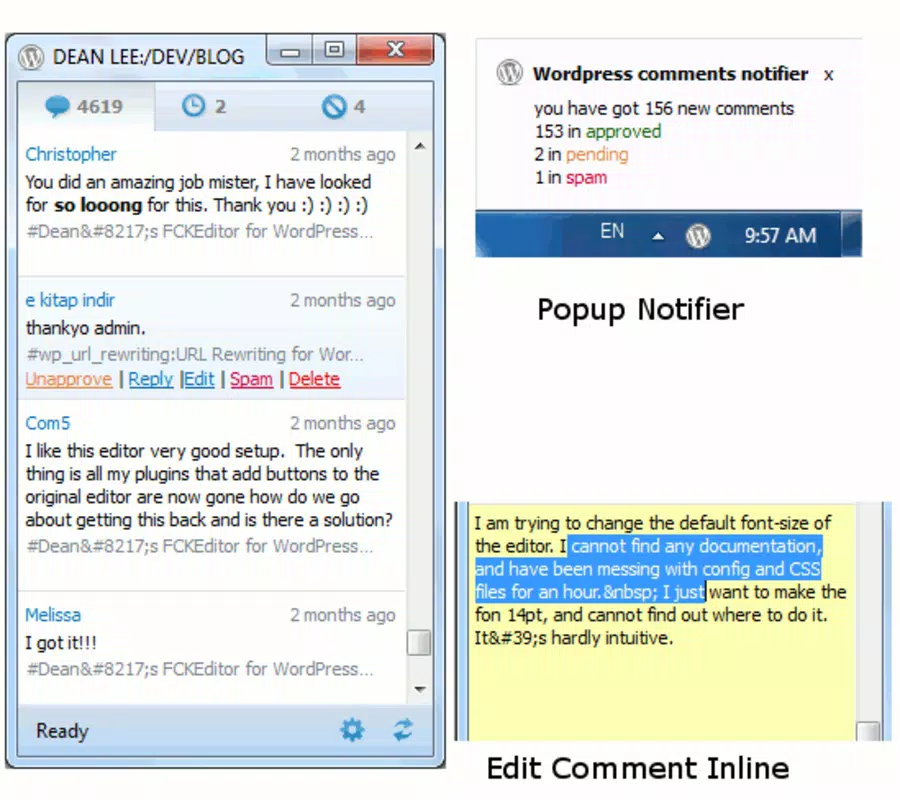
- Desktop Notification System: The app delivers real-time alerts whenever a new comment is posted on your WordPress site. These notifications appear directly on your desktop, ensuring you never miss an opportunity to engage with readers, even when your browser is closed.
- Comment Management Interface: Users can view, edit, or delete comments directly from the desktop app. This includes marking comments as spam, approving them, or removing inappropriate content with minimal effort and a few clicks.
- Direct Response Capability: Instead of navigating through multiple browser tabs, users can reply to comments instantly from within the application, reducing response time and improving audience interaction.
- System Tray Integration: The app runs in the system tray, maintaining a low profile while remaining accessible at any time. This ensures continuous monitoring without disrupting your workflow.
- User-Friendly Design: The interface is straightforward and intuitive, making it suitable for users of all technical skill levels. No prior experience with coding or advanced tools is required to manage blog comments effectively.
- Lightweight Performance: At just 2.1 MB, the application consumes minimal system resources, ensuring smooth operation without slowing down your desktop environment.
For example, a blogger managing a daily news site can use the app to respond to reader feedback within minutes of a comment being posted, fostering a dynamic and responsive community. Similarly, a small business owner can monitor customer inquiries or reviews in real time, improving customer service and brand credibility.
Interface, UX & Performance
The user interface of Wordpress Comment Notifier is designed with simplicity and efficiency in mind. It features a clean layout with clearly labeled sections for viewing new comments, responding, and managing moderation options. Navigation is intuitive, relying on standard desktop interaction patterns such as click-to-respond and right-click context menus, which reduces the learning curve for new users.
Although the developer did not list formal performance metrics, the app’s lightweight nature suggests consistent responsiveness across a range of desktop systems. It is optimized to operate in the background with minimal impact on CPU or memory usage, making it suitable for both older and modern machines.
Stability appears to be a key strength, as the app has remained functional since its initial release in 2010. The system tray integration ensures the app remains accessible without cluttering the desktop, and notifications are delivered promptly without delays. Users can expect a smooth experience when managing comments, especially when compared to the overhead of using a full browser session for moderation tasks.
Platform Compatibility & Technical Requirements
Wordpress Comment Notifier is available for the Windows platform. The current version is 1.0.0, with a file size of 2.1 MB. It is distributed as a free application, making it accessible to all WordPress users regardless of budget.
The developer did not specify minimum OS requirements, nor did they provide details on compatibility with specific Windows versions. However, given its lightweight design and long-standing release history, it is likely compatible with a wide range of Windows operating systems, including Windows 7 and later versions. Users should ensure their system supports standard desktop applications and background processes for optimal functionality.
Pros and Cons
Pros
- Lightweight and fast performance with minimal system resource usage.
- Real-time desktop notifications for new comments.
- Direct comment management and response without browser dependency.
- Intuitive interface suitable for users of all technical levels.
- System tray integration for continuous, unobtrusive operation.
- Free to download and use with no hidden costs.
Cons
- Platform is limited to Windows; no information available for macOS or Linux.
- Specific OS requirements were not disclosed by the developer.
- No cloud sync or multi-device support mentioned.
- Feature set appears basic; may lack advanced moderation tools.
- Long release history suggests limited recent updates.
FAQ
Is Wordpress Comment Notifier safe to download and use?
Yes, the application is free and available from its official developer. As with any third-party tool, users should ensure they download it from a trusted source to avoid potential risks.
Can I use this app on multiple devices?
The developer did not specify whether the app supports multi-device usage or synchronization across systems.
Does the app work with all WordPress sites?
It is designed to work with standard WordPress installations that support comment notifications. Users should confirm their site’s API or authentication settings are properly configured.
Is the app updated regularly?
While the app has been available since 2010, the developer did not provide information about update frequency or recent development activity.
Do I need a special WordPress plugin to use this app?
There is no indication that a plugin is required. The app likely connects directly to the WordPress REST API or comment feed, but specific technical details were not provided.
Final Thoughts + CTA
Wordpress Comment Notifier stands out as a practical, no-frills tool for bloggers and content managers who value speed, simplicity, and direct engagement. Its lightweight design, real-time alerts, and desktop integration offer a tangible improvement over traditional browser-based moderation. While it lacks modern features like cloud sync or cross-platform availability, its core functionality remains highly effective for users focused on timely comment interaction.
For WordPress bloggers, especially those managing high-traffic sites or seeking to improve reader engagement, this app delivers a reliable and efficient solution. It is particularly beneficial for individuals who prefer a minimal, distraction-free workflow and want to stay connected to their audience without switching contexts.
With its free price tag and proven track record, Wordpress Comment Notifier remains a solid choice for desktop-based blog moderation. If you're looking to enhance your WordPress engagement strategy with a fast, lightweight tool, this app is worth considering.
Download Wordpress Comment Notifier now


